

Download Xiret – free Windows Experience Index tool, portable performance checker
Overview
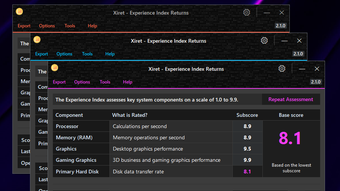
Xiret is a free, open‑source utility that revives the classic Windows Experience Index (WEI) on modern PC hardware. Developed by the community programmer 0x43616c, Xiret delivers a clean graphical user interface (GUI) for the Windows System Assessment Tool (WinSAT) that Microsoft retired after Windows 8.1. By harnessing the same scoring algorithm that produced the five subscores – CPU, memory, 2D graphics, 3D graphics, and disk – Xiret lets users quickly gauge how well their system is performing relative to the original WEI benchmark.
The program is written in C# and compiled as a portable executable, meaning you can run it directly from a USB stick or cloud‑synced folder without a traditional installation. Whether you’re a long‑time enthusiast who misses the simple “one‑click” performance snapshot, or a newcomer looking for a lightweight reference point before diving into deeper benchmarks, Xiret offers a straightforward, no‑frills solution. Its design emphasizes ease of use, customizability, and the ability to export results as images or plain‑text files for sharing or archival purposes.
While Xiret’s scores should be treated as indicative rather than definitive—real‑world workloads and dedicated benchmarking suites still provide the most granular insight—it remains an excellent first‑step diagnostic tool for anyone wanting a quick health check on their Windows PC.
Key Features
- Portable Execution: Run Xiret from any folder or removable drive; no installation required.
- Full WEI Compatibility: Generates the classic five‑component scores (CPU, Memory, 2D Graphics, 3D Graphics, Disk) using the original WinSAT algorithm.
- Normal & In‑Depth Assessment Modes: Choose a quick overview or a thorough scan that evaluates each subsystem more rigorously.
- Custom Export Options: Save results as high‑resolution PNG images or plain‑text files for documentation, forums, or personal logs.
- Simple, Modern GUI: Clean Windows‑styled interface with clear progress bars, real‑time updates, and tool‑tips for each metric.
- Open‑Source Transparency: Source code available on GitHub, allowing community contributions, audits, and feature extensions.
- Multi‑Version Support: Works on every Windows release that originally hosted WinSAT, including Vista, 7, 8, 8.1, 10, and 11 (when run in compatibility mode).
- Low Resource Footprint: Consumes minimal CPU and memory, making it safe to run on older or resource‑constrained machines.
Installation, Compatibility & How to Use Xiret
Supported Operating Systems: Windows Vista, Windows 7, Windows 8, Windows 8.1, Windows 10, and Windows 11 (via compatibility settings). Because Xiret is a portable .NET application, it runs on any Windows version with the .NET Framework 4.6 or later installed.
Downloading and Launching
Start by visiting the official GitHub releases page for Xiret. Click the Download ZIP button, extract the archive to a location of your choice, and locate the executable file named Xiret.exe. Because the program is portable, you can double‑click the file to launch it instantly—no installer, no admin rights, and no registry changes.
Running an Assessment
Upon launch, Xiret presents a welcoming splash screen with two primary buttons: Normal Assessment and In‑Depth Assessment. Selecting Normal initiates a quick scan that completes in under a minute on most modern PCs, delivering the five subscores and the overall WEI rating. The In‑Depth mode performs additional hardware stress cycles, producing slightly more accurate scores at the cost of longer runtime (typically 3‑5 minutes).
Interpreting the Results
Each subsystem is displayed with a numeric rating ranging from 1.0 (lowest) to 9.9 (highest). The overall WEI score is automatically set to the lowest of the five subscores, mirroring Microsoft’s original methodology. Use the color‑coded bars (green for high, orange for moderate, red for low) to instantly spot bottlenecks. For example, a low 3D Graphics score may indicate an older GPU that could benefit from driver updates or a hardware upgrade.
Exporting and Sharing
After the assessment finishes, click the Export button. Choose between Image (PNG) or Text (TXT) formats. The exported files include the date, system name, and all five component scores, making them ideal for forum posts, IT documentation, or personal benchmarking logs. Because the files are saved locally, you retain full control over your data privacy.
Pros & Cons
- Pros:
- Zero‑install, truly portable.
- Recreates the classic WEI metric that many users still trust.
- Lightweight and fast, even on older hardware.
- Export options simplify sharing and record‑keeping.
- Open‑source transparency encourages community trust.
- Cons:
- Limited to the original WinSAT algorithm; does not replace modern benchmarking suites.
- Requires .NET Framework 4.6+, which may need installation on very old systems.
- Only runs on Windows; no native macOS, Linux, Android, or iOS versions.
Frequently Asked Questions & Final Verdict
Is Xiret completely free or does it have hidden costs?
Xiret is 100 % free and open‑source. There are no paid upgrades, subscription fees, or hidden advertisements. All source code and binaries are released under the MIT license, allowing anyone to use or modify the software without charge.
Can I run Xiret on Windows 11?
Yes. While the original WEI was removed after Windows 8.1, Xiret works on Windows 11 when launched in compatibility mode for Windows 8.1 or later. The portable nature of the tool means it bypasses many of the system restrictions that affected the legacy WinSAT utility.
Do I need an internet connection to generate scores?
No. Xiret performs all calculations locally using the WinSAT algorithm bundled within the executable. An internet connection is only required if you need to download the .NET Framework runtime or want to fetch the latest release from GitHub.
How accurate are Xiret’s results compared to modern benchmarks?
Xiret faithfully reproduces the original WEI scoring methodology, which provides a quick, high‑level view of system capability. However, it does not replace detailed synthetic benchmarks (e.g., 3DMark, PassMark) that stress individual components more aggressively. Use Xiret as a first‑order reference, then follow up with specialized tools for in‑depth analysis.
Can I contribute to Xiret’s development?
Absolutely. The project is hosted on GitHub, and the repository welcomes pull requests, issue reports, and feature suggestions. Because it’s licensed under MIT, you’re free to fork the code, add enhancements, or even create custom builds for niche use‑cases.
Final Verdict
For Windows users who miss the simplicity of the classic Windows Experience Index, Xiret fills a niche that modern benchmarking suites often overlook. Its portable, zero‑install design means you can evaluate a machine in minutes, export the results, and share them without leaving a trace on the host system. While it should not be the sole tool for performance tuning, Xiret provides a reliable, free, and open‑source baseline that many tech enthusiasts still find valuable. If you’re looking for a quick health check or want to resurrect the familiar WEI scores on a modern PC, download Xiret today and see how your hardware stacks up against the legacy benchmark.
Rating: 4.5 / 5
Pros: Portable, free, authentic WEI scores, easy export, open‑source.
Cons: Limited to Windows, not a full‑scale benchmark, requires .NET.







